As in the previous chapter, the problem is to forecast one monthly time series: Beer, Wine, and Distilled Alcoholic Beverages Sales, following the original Matt Dancho example. The data comes from FRED, the Federal Reserve Economic Data database. The series belongs to the non-durable goods category; it includes U.S. merchant wholesalers, excluding manufacturers’ sales branches and offices. The observations run from 2010-01-01 to 2022-10-31. The goal is to estimate models with information available before 2022 and evaluate their forecasts over the 10 available months of 2022.
For the full database details see: https://fred.stlouisfed.org/series/S4248SM144NCEN
First load the R packages.
Code
# Load libraries.library(fpp3)library(timetk) # Toolkit for working with time series in R.library(tidyquant) # Loads tidyverse, financial packages, and data tools.library(dplyr) # Database manipulation.library(ggplot2) # Plots.library(tibble) # Tables.library(kableExtra) # Tables.library(knitr)library(sweep) # Broom-style tidiers for the forecast package.library(forecast) # Forecasting models and predictions package.library(seasonal)library(lubridate)library(rpart) # Lightweight regression trees.library(nnet) # Lightweight neural networks.
Code
# This comes from 01-forecasting-with-fpp3.qmd.mape_updated <-readRDS("mape_updated.rds")
We can conveniently download the data directly from the FRED API in one line of code.
Code
# Beer, Wine, Distilled Alcoholic Beverages, in Millions USD.beer <-tq_get("S4248SM144NCEN", get ="economic.data",from ="2010-01-01", to ="2022-10-31")if (!is.data.frame(beer) ||!all(c("date", "price") %in%names(beer))) { fred_beer <-read.csv("https://fred.stlouisfed.org/graph/fredgraph.csv?id=S4248SM144NCEN",stringsAsFactors =FALSE ) beer <- fred_beer %>%transmute(date =as.Date(observation_date),price =as.numeric(S4248SM144NCEN) ) %>%filter(date >=as.Date("2010-01-01"), date <=as.Date("2022-10-31")) %>%filter(!is.na(price))}if (!is.data.frame(beer) ||!all(c("date", "price") %in%names(beer))) {stop("The FRED beer sales series could not be loaded as a data frame.")}
The first rows show the structure of the data set. By default the value column is named price, although these are sales figures in monetary terms. According to the main FRED reference, these are in millions of dollars and are reported before seasonal adjustment.
The column name now identifies the variable as sales.
2.1 Supervised forecasting workflow
In this chapter, machine learning is used as a forecasting tool. The goal is narrowly defined: forecast a monthly time series by turning calendar and trend information into predictors. In time series forecasting, the supervised learning idea is to transform an ordered sequence into a modeling table: build a table of predictors called \(X\), keep the variable we want to forecast as \(y\), estimate a model on the training data, tune it with validation data, and evaluate it once on the test data.
This chapter uses the same forecasting problem as before with an explicit supervised forecasting workflow. The chapter writes the model comparison directly: we create the predictors, choose the candidate model families, tune the few hyperparameters by hand, and evaluate the final models on a holdout period. The models are smaller, faster to render in Quarto, easier to explain, and easier to debug. The workflow is also close to what students need to understand:
create time-based features;
split the data without shuffling the time order;
fit several explicit models;
choose hyperparameters with the validation set;
evaluate the chosen models on a test set held apart from fitting and tuning.
We will compare three transparent machine-learning forecasting alternatives:
a multivariate linear regression;
a regression tree;
a small neural network.
The first model is highly interpretable. The tree is nonlinear and can capture simple threshold behavior. The neural network is also nonlinear. We keep it small so the model remains pedagogical and reproducible.
Mathematically, this chapter changes the forecasting problem from a univariate time-series model into a supervised forecasting regression problem. The first chapter used models built directly from the history of the series. This chapter turns each month into one row of a modeling table:
Row element
Meaning
sales
The value we want to forecast.
index.num
A numeric time trend.
year
A coarse trend variable and split variable.
month.lbl
Monthly seasonality.
Then each supervised forecasting model estimates a rule
\[
\text{sales} = f(\text{trend and month variables}) + \text{error}.
\]
The three alternatives below differ in how flexible we allow the rule to be. Linear regression uses an additive straight-line rule. The regression tree uses if-then splits. The neural network uses a small nonlinear rule. The transparency principle is simple: we can see the columns, we can see the candidate model families, and the test set is reserved for the final evaluation.
The data split has three different jobs:
Sample
Dates
Job in the workflow
Training
2010-2020
Estimate model parameters.
Validation
2021
Choose hyperparameters such as tree complexity or neural-network size.
Test
January-October 2022
Evaluate the selected models once.
2.2 The data
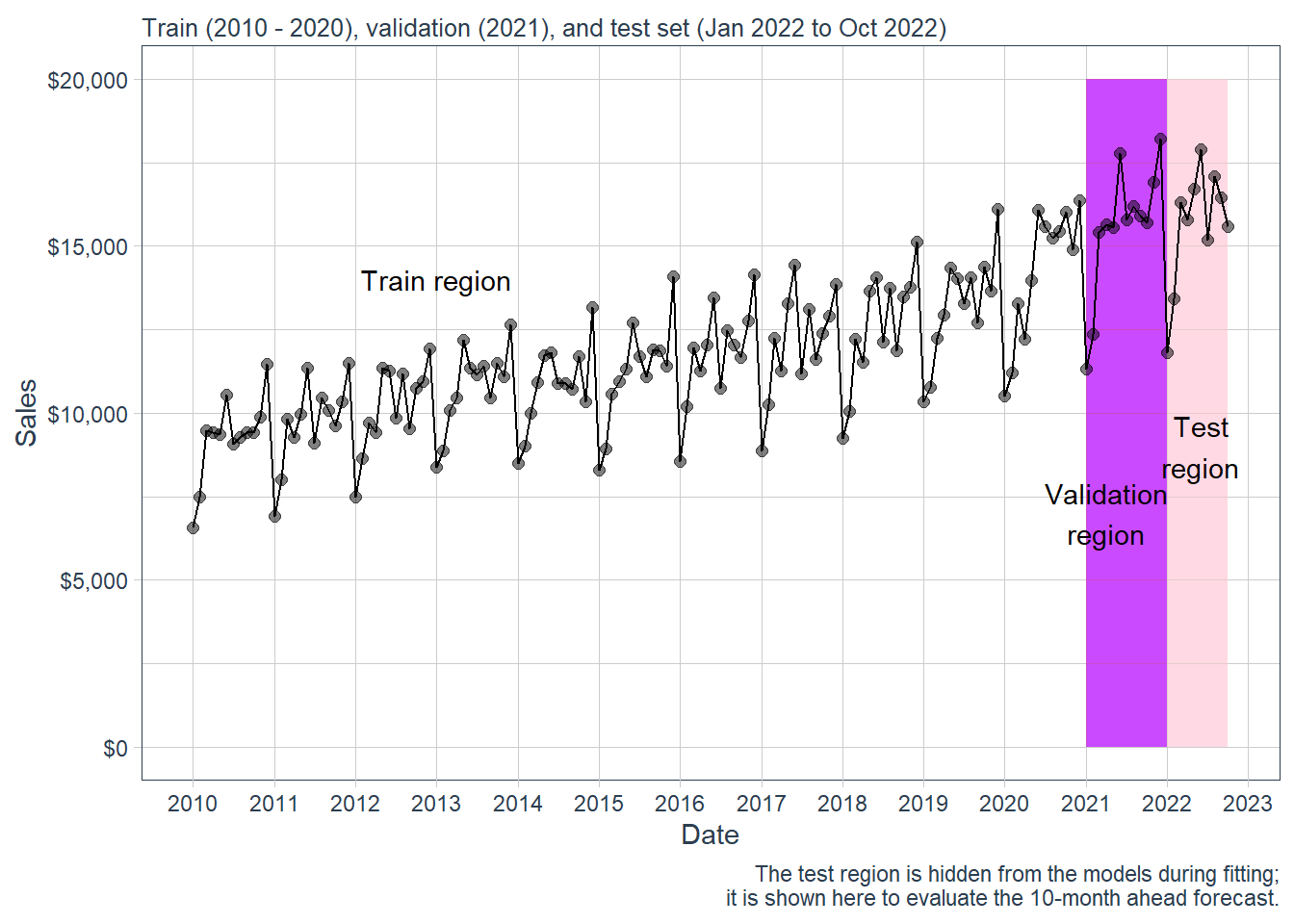
We need an additional data set. The validation data set is used for model selection: it helps us choose hyperparameters before touching the final test period. The new data sets are the following.
Code
beer %>%ggplot(aes(date, sales)) +annotate("text", x =ymd("2013-01-01"), y =14000,color ="black", label ="Train region") +geom_rect(xmin =as.numeric(ymd("2021-01-01")),xmax =as.numeric(ymd("2021-12-31")), ymin =0, ymax =20000,alpha =0.01, fill ="purple") +annotate("text", x =ymd("2021-04-01"), y =7000,color ="black", label ="Validation\nregion") +geom_rect(xmin =as.numeric(ymd("2022-01-01")),xmax =as.numeric(ymd("2022-09-30")), ymin =0, ymax =20000,alpha =0.02, fill ="pink") +annotate("text", x =ymd("2022-06-01"), y =9000,color ="black", label ="Test\nregion") +geom_line(col ="black") +geom_point(col ="black", alpha =0.5, size =2) +theme_tq() +scale_x_date(date_breaks ="1 year", date_labels ="%Y") +labs(subtitle ="Train (2010 - 2020), validation (2021), and test set (Jan 2022 to Oct 2022)",x ="Date", y ="Sales",caption ="The test region is hidden from the models during fitting; it is shown here to evaluate the 10-month ahead forecast.") +scale_y_continuous(labels = scales::dollar)
Figure 2.1: Beer sales: train, validation and test sets.
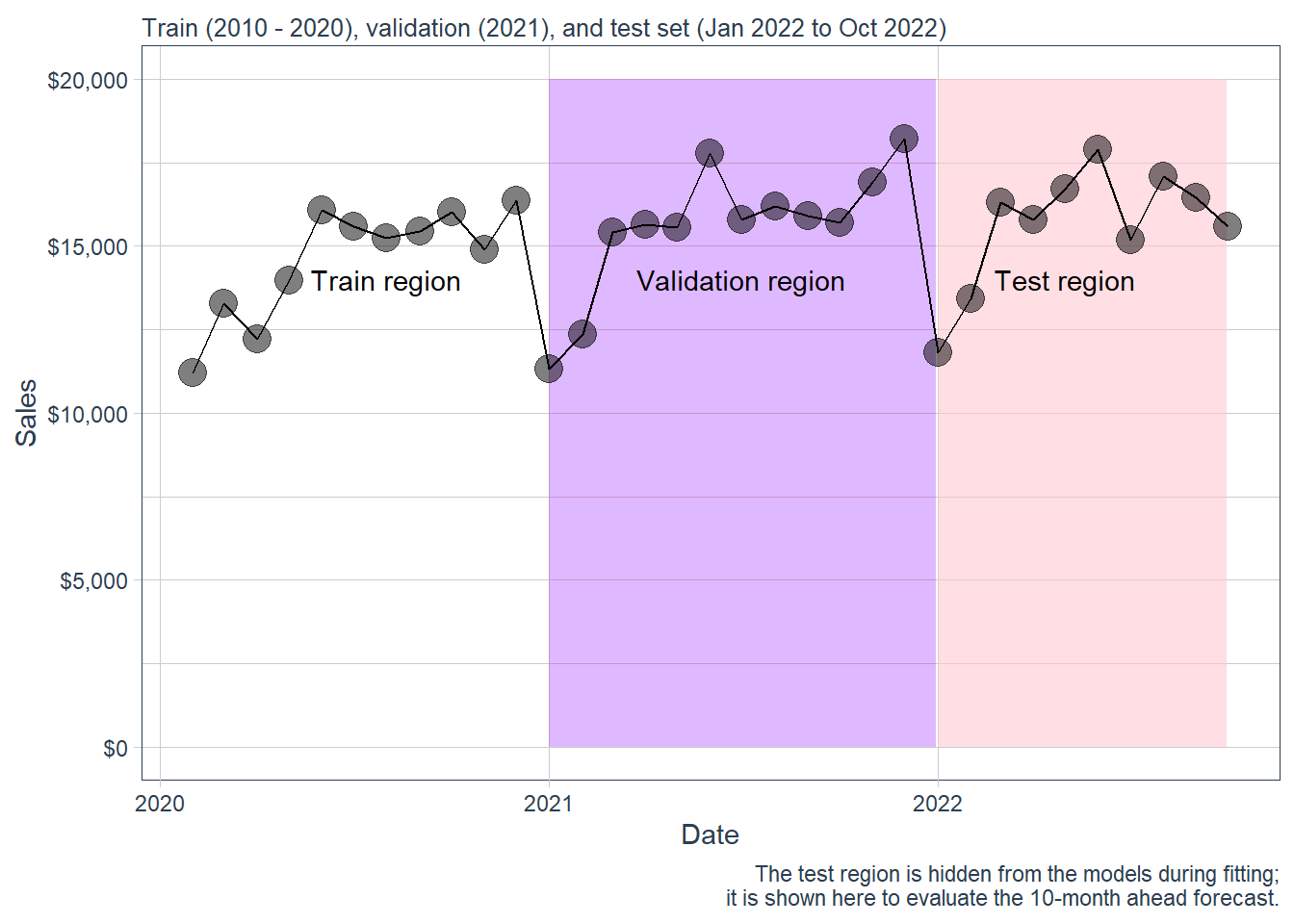
And the corresponding zoom version.
Code
beer %>%filter(date >as.Date("2020-01-01")) %>%ggplot(aes(date, sales)) +annotate("text", x =ymd("2020-08-01"), y =14000,color ="black", label ="Train region") +geom_rect(xmin =as.numeric(ymd("2021-01-01")),xmax =as.numeric(ymd("2021-12-31")), ymin =0, ymax =20000,alpha =0.01, fill ="purple") +annotate("text", x =ymd("2021-07-01"), y =14000,color ="black", label ="Validation region") +geom_rect(xmin =as.numeric(ymd("2022-01-01")),xmax =as.numeric(ymd("2022-09-30")), ymin =0, ymax =20000,alpha =0.02, fill ="pink") +annotate("text", x =ymd("2022-05-01"), y =14000,color ="black", label ="Test region") +geom_line(col ="black") +geom_point(col ="black", alpha =0.5, size =5) +theme_tq() +scale_x_date(date_breaks ="1 year", date_labels ="%Y") +labs(subtitle ="Train (2010 - 2020), validation (2021), and test set (Jan 2022 to Oct 2022)",x ="Date", y ="Sales",caption ="The test region is hidden from the models during fitting; it is shown here to evaluate the 10-month ahead forecast.") +scale_y_continuous(labels = scales::dollar)
Figure 2.2: Zoom. Beer sales: train, validation and test sets.
The tk_augment_timeseries_signature() function expands the timestamp information column-wise into a forecasting feature set. The original data set has a date, a symbol, and the sales variable. The augmented data includes calendar information such as year, month, quarter, semester and other time features. Only some of them will be useful for the final models. The full list still helps us inspect the forecasting problem as a supervised forecasting problem.
The full signature is useful for inspection. For this monthly data set, it is broader than necessary. Many columns describe hours, seconds, weekdays, or day-of-month details. They are meaningful for hourly or daily data. In this monthly problem, they mostly encode calendar artifacts. We keep a smaller set:
sales, the target variable;
index.num, a numeric time index for the trend;
year, a coarse trend variable that also makes the split readable;
month.lbl, a factor for monthly seasonality.
This modeling decision keeps the target variable intact and makes the supervised forecasting matrix easier to explain. It also reduces dependence on irrelevant timestamp fragments.
The retained features define the design matrix used by the models. Because month.lbl is a categorical variable, R expands it internally into 0/1 dummy variables. For example, define
\[
D_{t,\text{Feb}} =
\begin{cases}
1, & \text{month } t \text{ is February},\\
0, & \text{otherwise.}
\end{cases}
\]
The same idea is repeated for March through December. Conceptually, the row for month \(t\) is
January is absorbed into the intercept by default. The important forecasting point is that every predictor in \(x_t\) is known before the sales value \(y_t\) is observed. Future dates, years, and months are known in advance, so these predictors keep the future sales value unavailable to the model.
Code
selected_ml_columns <-c("sales", "index.num", "year", "month.lbl")feature_decisions <-tibble(variable =colnames(beer_aug)) %>%mutate(decision =case_when( variable =="sales"~"Target", variable %in% selected_ml_columns ~"Keep",TRUE~"Drop" ),reason =case_when( variable =="sales"~"Value we want to forecast.", variable =="index.num"~"Numeric trend over time.", variable =="year"~"Coarse trend and readable split variable.", variable =="month.lbl"~"Monthly seasonal factor.", variable =="date"~"Raw Date object; useful for plots; excluded as a direct predictor here.", variable =="symbol"~"Constant because there is only one series.", variable %in%c("hour", "minute", "second", "hour12", "am.pm") ~"Intraday information; irrelevant for monthly observations.", variable %in%c("day", "wday", "wday.xts", "wday.lbl", "mday","qday", "yday", "mweek", "week", "week.iso","week2", "week3", "week4", "mday7") ~"Daily or weekly calendar artifact for monthly data.",TRUE~"Redundant with the retained trend or monthly seasonality variables." ) )kable(feature_decisions,caption ="Feature-selection decision for the time-series signature.",row.names =FALSE) %>%kable_styling(latex_options ="HOLD_position")
Feature-selection decision for the time-series signature.
variable
decision
reason
symbol
Drop
Constant because there is only one series.
date
Drop
Raw Date object; useful for plots; excluded as a direct predictor here.
sales
Target
Value we want to forecast.
index.num
Keep
Numeric trend over time.
diff
Drop
Redundant with the retained trend or monthly seasonality variables.
year
Keep
Coarse trend and readable split variable.
year.iso
Drop
Redundant with the retained trend or monthly seasonality variables.
half
Drop
Redundant with the retained trend or monthly seasonality variables.
quarter
Drop
Redundant with the retained trend or monthly seasonality variables.
month
Drop
Redundant with the retained trend or monthly seasonality variables.
month.xts
Drop
Redundant with the retained trend or monthly seasonality variables.
month.lbl
Keep
Monthly seasonal factor.
day
Drop
Daily or weekly calendar artifact for monthly data.
hour
Drop
Intraday information; irrelevant for monthly observations.
minute
Drop
Intraday information; irrelevant for monthly observations.
second
Drop
Intraday information; irrelevant for monthly observations.
hour12
Drop
Intraday information; irrelevant for monthly observations.
am.pm
Drop
Intraday information; irrelevant for monthly observations.
wday
Drop
Daily or weekly calendar artifact for monthly data.
wday.xts
Drop
Daily or weekly calendar artifact for monthly data.
wday.lbl
Drop
Daily or weekly calendar artifact for monthly data.
mday
Drop
Daily or weekly calendar artifact for monthly data.
qday
Drop
Daily or weekly calendar artifact for monthly data.
yday
Drop
Daily or weekly calendar artifact for monthly data.
mweek
Drop
Daily or weekly calendar artifact for monthly data.
week
Drop
Daily or weekly calendar artifact for monthly data.
week.iso
Drop
Daily or weekly calendar artifact for monthly data.
week2
Drop
Daily or weekly calendar artifact for monthly data.
week3
Drop
Daily or weekly calendar artifact for monthly data.
week4
Drop
Daily or weekly calendar artifact for monthly data.
mday7
Drop
Daily or weekly calendar artifact for monthly data.
We now build the actual modeling table from the selected variables and convert ordered factors into plain factors. The target variable sales remains unchanged; the code only prepares the predictor matrix.
# A tibble: 6 × 4
  sales  index.num  year month.lbl
  <int>      <dbl> <int> <fct>
1  6558 1262304000  2010 enero
2  7481 1264982400  2010 febrero
3  9475 1267401600  2010 marzo
4  9424 1270080000  2010 abril
5  9351 1272672000  2010 mayo
6 10552 1275350400  2010 junio
We split the database into training, validation and test sets following the time ranges in the visualization above. The test set is the most recent data. It remains unavailable during model fitting and tuning.
The split can be read directly from the year column:
Sample
Rule in the code
Use
Training
year < 2021
Fit model parameters.
Validation
year == 2021
Choose hyperparameters.
Test
year == 2022
Evaluate the chosen models.
The validation set is used to choose hyperparameters. The test set is used only after the choices have been made.
Our goal is to forecast the first 10 months of 2022.
2.3 Validation workflow
The following support functions keep the comparison compact. They calculate the same error measures for every model: mean error, root mean squared error, mean absolute error, mean absolute percentage error, and mean percentage error.
For a validation or test sample of size \(n\), with predictions \(\hat{y}_t\), the main metrics are:
The linear regression has no hyperparameters. It is our transparent baseline. If this model works well, that is useful information: sometimes a simple model is enough when trend and seasonality are strong.
Here, \(D_{t,j}\) is a monthly dummy variable: it equals 1 when observation \(t\) belongs to month \(j\), and 0 otherwise. January is the baseline month because it is absorbed by the intercept. The coefficients have a direct interpretation: the trend variables explain long-run movement, and the monthly dummy variables explain seasonality relative to January. The code lm(sales ~ .) means: regress sales on all remaining columns in the modeling table.
The regression tree has a complexity parameter, cp. A smaller value allows a larger tree; a larger value prunes the tree more aggressively. We estimate a small grid and choose the value that minimizes validation RMSE.
A regression tree asks a sequence of yes/no questions about the predictors. For example: is the month December? is the time index above a certain value? After following those questions to a final group, the forecast is the average sales value among the training observations in that group:
\[
\text{tree forecast}
=
\text{average sales in the final group}.
\]
The cp parameter controls the cost of adding more splits. A useful way to read it is as a penalty on tree complexity: larger cp values prune more splits, and smaller cp values allow more splits.
Small cp values allow more regions and can overfit. Large cp values produce simpler trees and can underfit. We choose cp using the validation set. The test set remains reserved for the final evaluation.
The neural network also receives a small manual search. We tune two hyperparameters: size, the number of hidden units, and decay, a penalty that discourages overly large weights. Because the variables have different scales, we standardize the model matrix before fitting.
The neural network uses the same predictors as the linear regression and tree. The difference is the way it combines them. It first standardizes the inputs, then creates a small number of hidden units, and finally combines those hidden units into one forecast. The size hyperparameter controls how many hidden units are used. The decay hyperparameter discourages very large weights, so the fitted rule stays smoother.
Its inputs remain the same explicit features used by the linear regression and the tree. The extra flexibility comes from the hidden layer and the nonlinear activation function.
The support functions below do five mechanical tasks:
Step
What the code does
Why it is important
1
Build the model matrix from the formula.
Convert factors such as month into numeric columns.
2
Standardize the predictors.
Put all inputs on comparable scales.
3
Standardize the target variable.
Help the neural network optimize more smoothly.
4
Fit the network with nnet().
Estimate the weights in the hidden and output layers.
The validation leaderboard summarizes the model selection step. The final forecasting performance is evaluated later with the test set.
For each model family, we choose the setting with the smallest validation RMSE. For the tree, the setting is cp. For the neural network, the setting is the pair (size, decay). Linear regression has no tuning grid, so it enters the leaderboard once.
Validation leaderboard for machine-learning forecasting models.
model
family
setting
me
rmse
mae
mape
mpe
Neural network
Neural network
size = 3, decay = 0
488.20
1138.07
836.93
5.63
2.87
Neural network
Neural network
size = 3, decay = 0.01
792.02
1179.28
954.10
5.94
4.90
Neural network
Neural network
size = 1, decay = 0
1060.20
1195.32
1060.20
6.72
6.72
Neural network
Neural network
size = 1, decay = 0.001
1150.18
1266.56
1150.18
7.30
7.30
Neural network
Neural network
size = 5, decay = 0.01
794.89
1313.70
1087.58
6.97
5.10
Neural network
Neural network
size = 1, decay = 0.01
1236.29
1346.37
1236.29
7.81
7.81
Neural network
Neural network
size = 5, decay = 0
392.53
1370.39
1185.47
7.59
2.22
Neural network
Neural network
size = 3, decay = 0.001
1098.68
1410.56
1149.21
7.10
6.66
Linear regression
Linear regression
selected calendar features
1367.15
1550.66
1372.10
8.40
8.36
Neural network
Neural network
size = 5, decay = 0.001
-92.34
1640.64
1223.46
7.69
-0.80
Regression tree
Regression tree
cp = 0.001
1352.94
1788.57
1382.30
8.78
8.60
Regression tree
Regression tree
cp = 0.005
1445.38
1859.65
1474.74
9.57
9.38
Regression tree
Regression tree
cp = 0.01
1445.38
1859.65
1474.74
9.57
9.38
Regression tree
Regression tree
cp = 0.02
1400.90
1948.70
1400.90
8.83
8.83
Regression tree
Regression tree
cp = 0.05
1400.90
1948.70
1400.90
8.83
8.83
2.4 Test forecasts
Now we refit the chosen model specifications using the training and validation data together, from 2010 through 2021. Then we forecast the 2022 test set. This is a standard practice: validation is used to make modeling decisions, and after that decision is made we can use all pre-test information to estimate the final model.
The final fitted function uses all observations from 2010 through 2021 and the hyperparameters selected in validation. The test forecasts are obtained by applying that final fitted rule to the 2022 rows.
This ordering prevents methodological leakage: the test sales values never enter coefficient estimation, cp selection, neural-network size selection, or neural-network decay selection.
The table below shows the 10-month forecast errors.
Code
ml_errors <-bind_rows(forecast_error_tbl("ML forecast: linear regression", pred_lm_test),forecast_error_tbl("ML forecast: regression tree", pred_tree_test),forecast_error_tbl("ML forecast: neural network", pred_nnet_test))kable(ml_errors,caption ="Detailed test performance for machine-learning forecasting models.",digits =3,row.names =FALSE) %>%kable_styling(latex_options ="HOLD_position")
Detailed test performance for machine-learning forecasting models.
model
date
actual
pred
error
error_pct
ML forecast: linear regression
2022-01-01
11801
12048.17
-247.168
-0.021
ML forecast: linear regression
2022-02-01
13435
12948.50
486.498
0.036
ML forecast: linear regression
2022-03-01
16292
14619.16
1672.844
0.103
ML forecast: linear regression
2022-04-01
15772
14477.24
1294.761
0.082
ML forecast: linear regression
2022-05-01
16714
15601.41
1112.594
0.067
ML forecast: linear regression
2022-06-01
17899
16443.74
1455.261
0.081
ML forecast: linear regression
2022-07-01
15193
14908.49
284.511
0.019
ML forecast: linear regression
2022-08-01
17069
15625.41
1443.594
0.085
ML forecast: linear regression
2022-09-01
16443
15013.07
1429.927
0.087
ML forecast: linear regression
2022-10-01
15585
15577.07
7.927
0.001
ML forecast: regression tree
2022-01-01
11801
11084.83
716.167
0.061
ML forecast: regression tree
2022-02-01
13435
11084.83
2350.167
0.175
ML forecast: regression tree
2022-03-01
16292
16173.25
118.750
0.007
ML forecast: regression tree
2022-04-01
15772
16173.25
-401.250
-0.025
ML forecast: regression tree
2022-05-01
16714
16173.25
540.750
0.032
ML forecast: regression tree
2022-06-01
17899
17100.25
798.750
0.045
ML forecast: regression tree
2022-07-01
15193
16173.25
-980.250
-0.065
ML forecast: regression tree
2022-08-01
17069
16173.25
895.750
0.052
ML forecast: regression tree
2022-09-01
16443
16173.25
269.750
0.016
ML forecast: regression tree
2022-10-01
15585
16173.25
-588.250
-0.038
ML forecast: neural network
2022-01-01
11801
11289.04
511.964
0.043
ML forecast: neural network
2022-02-01
13435
12925.93
509.073
0.038
ML forecast: neural network
2022-03-01
16292
16326.27
-34.270
-0.002
ML forecast: neural network
2022-04-01
15772
16363.52
-591.524
-0.038
ML forecast: neural network
2022-05-01
16714
16184.65
529.346
0.032
ML forecast: neural network
2022-06-01
17899
17725.16
173.840
0.010
ML forecast: neural network
2022-07-01
15193
17594.15
-2401.155
-0.158
ML forecast: neural network
2022-08-01
17069
16734.07
334.930
0.020
ML forecast: neural network
2022-09-01
16443
17511.51
-1068.509
-0.065
ML forecast: neural network
2022-10-01
15585
16931.42
-1346.422
-0.086
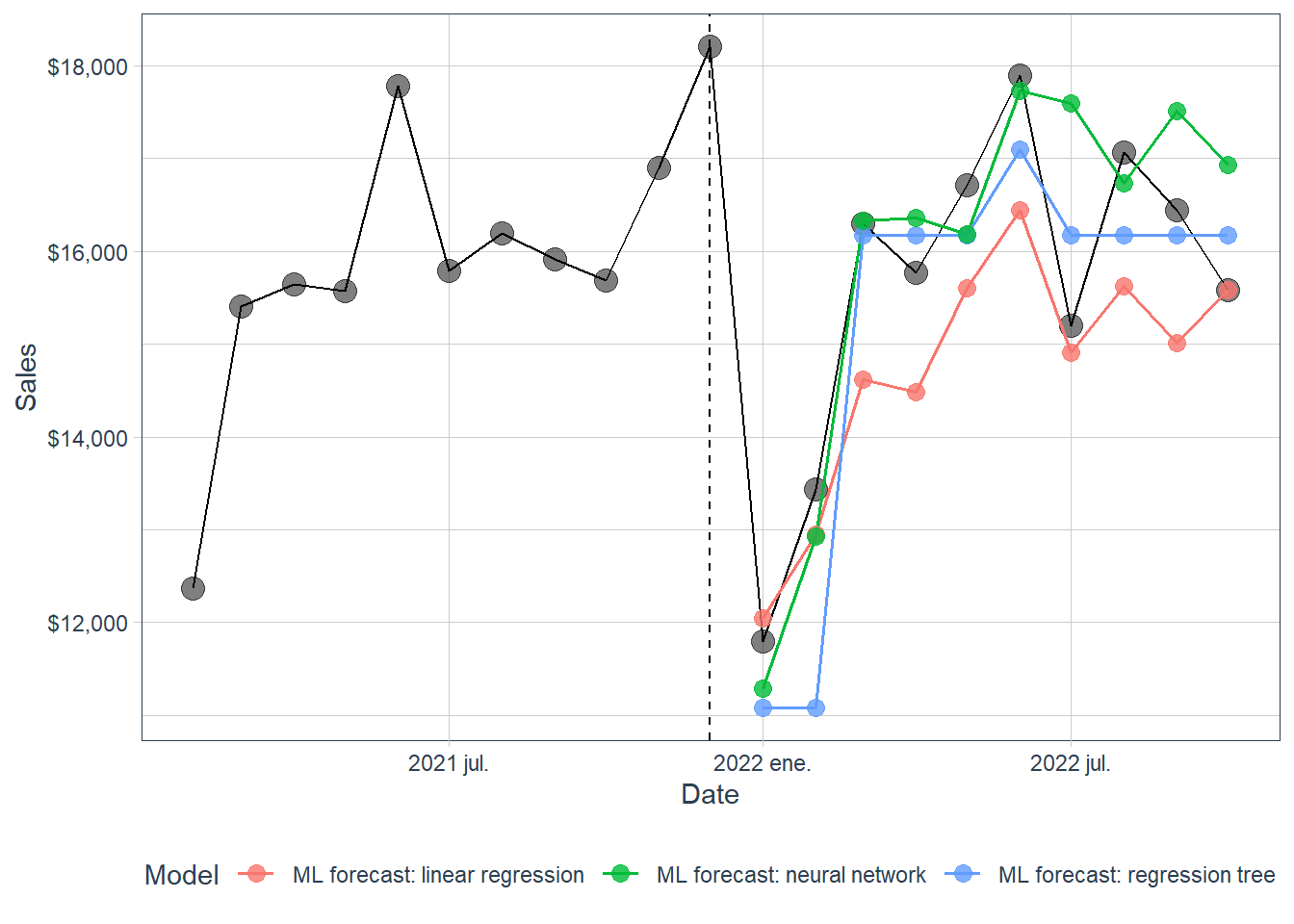
The same information is clearer in a plot. The black line is the actual series. The colored lines are the machine-learning forecasts for the 2022 test period.
Test summary for machine-learning forecasting models.
model
me
rmse
mae
mape
mpe
ML forecast: neural network
-338.27
1000.75
750.10
4.91
-2.07
ML forecast: regression tree
372.03
965.60
765.98
5.16
2.61
ML forecast: linear regression
894.07
1110.76
943.51
5.81
5.39
A model can rank first by MAPE and rank differently by another metric. For that reason, it is useful to inspect multiple errors. RMSE penalizes large mistakes more heavily, while MAPE is easy to read as an average percentage error.
The table compares fitted forecasting functions under a common experimental design. Every model saw the same training data, the same validation data, the same predictors, and the same test months. A lower MAPE means that this particular fitted function was closer to the realized 2022 sales over this holdout period.
In the current render, the machine-learning neural network forecast is the best of the three supervised forecasting models, with MAPE around 4.91. The regression tree follows with MAPE around 5.16, and the linear regression has MAPE around 5.81. The differences are modest, so the interpretation should focus on the pattern: calendar and trend predictors carry useful information, and a small nonlinear model extracts a little more from those predictors in this test window.
We can also show the best individual point forecast for each model.
Code
point_forecast_ml <- ml_errors %>%group_by(model) %>%slice_min(abs(error_pct), n =1, with_ties =FALSE) %>%ungroup() %>%select(model, date, actual, pred, error, error_pct)kable(point_forecast_ml,caption ="Best point forecast for each machine-learning forecasting model.",digits =4,row.names =FALSE) %>%kable_styling(latex_options ="HOLD_position")
Best point forecast for each machine-learning forecasting model.
model
date
actual
pred
error
error_pct
ML forecast: linear regression
2022-10-01
15585
15577.07
7.9273
0.0005
ML forecast: neural network
2022-03-01
16292
16326.27
-34.2696
-0.0021
ML forecast: regression tree
2022-03-01
16292
16173.25
118.7500
0.0073
Choosing a model according to one specific point forecast would be fragile. Even so, it is useful to see where each model was most accurate.
# A tibble: 10 × 2
   .model                          MAPE
   <chr>                          <dbl>
 1 fpp3: ETS(M,A,M)                3.77
 2 fpp3: seasonal naïve            3.89
 3 fpp3: ARIMA(4,1,1)(0,1,1)[12]   4.40
 4 ML forecast: neural network     4.91
 5 ML forecast: regression tree    5.16
 6 ML forecast: linear regression  5.81
 7 fpp3: NNAR(15,1,8)[12]          6.02
 8 fpp3: naïve                    18.1
 9 fpp3: drift                    20.9
10 fpp3: mean                     23.5
2.5 ARIMA comparison
As in the original Matt Dancho example, we include a different ARIMA workflow using the forecast package and the auto.arima() function. This benchmark belongs to the classical time-series family and answers a different modeling question. The machine-learning forecasting models above estimate \(\text{sales}=f(\text{trend and month variables})+\text{error}\) using trend and calendar predictors. ARIMA models the dependence of the series on its own past.
The auto.arima() function automates the selection of the ARIMA orders. The automation is a statistical search over candidate values of \((p,d,q)(P,D,Q)_{12}\), followed by parameter estimation and information-criterion comparison.
The order notation is read as follows:
Order
Meaning
\(p\)
Number of recent lagged values used by the autoregressive part.
\(d\)
Number of ordinary differences.
\(q\)
Number of recent forecast errors used by the moving-average part.
\(P\)
Number of seasonal lagged values.
\(D\)
Number of seasonal differences.
\(Q\)
Number of seasonal forecast errors.
12
Monthly seasonal cycle.
Prepare the data.
The tk_ts() function coerces time series objects and tibbles with date or date-time columns to ts.
We can use the auto.arima() function from the forecast package to model the time series. The function tests a set of specifications and selects the one that performs best according to its internal statistical criterion.
The printed output is the selected mathematical specification. After this line, we are no longer speaking abstractly about auto.arima(); we are speaking about the particular ARIMA equation selected for this data set and this training window.
The sw_tidy() function returns the model coefficients in a tibble.
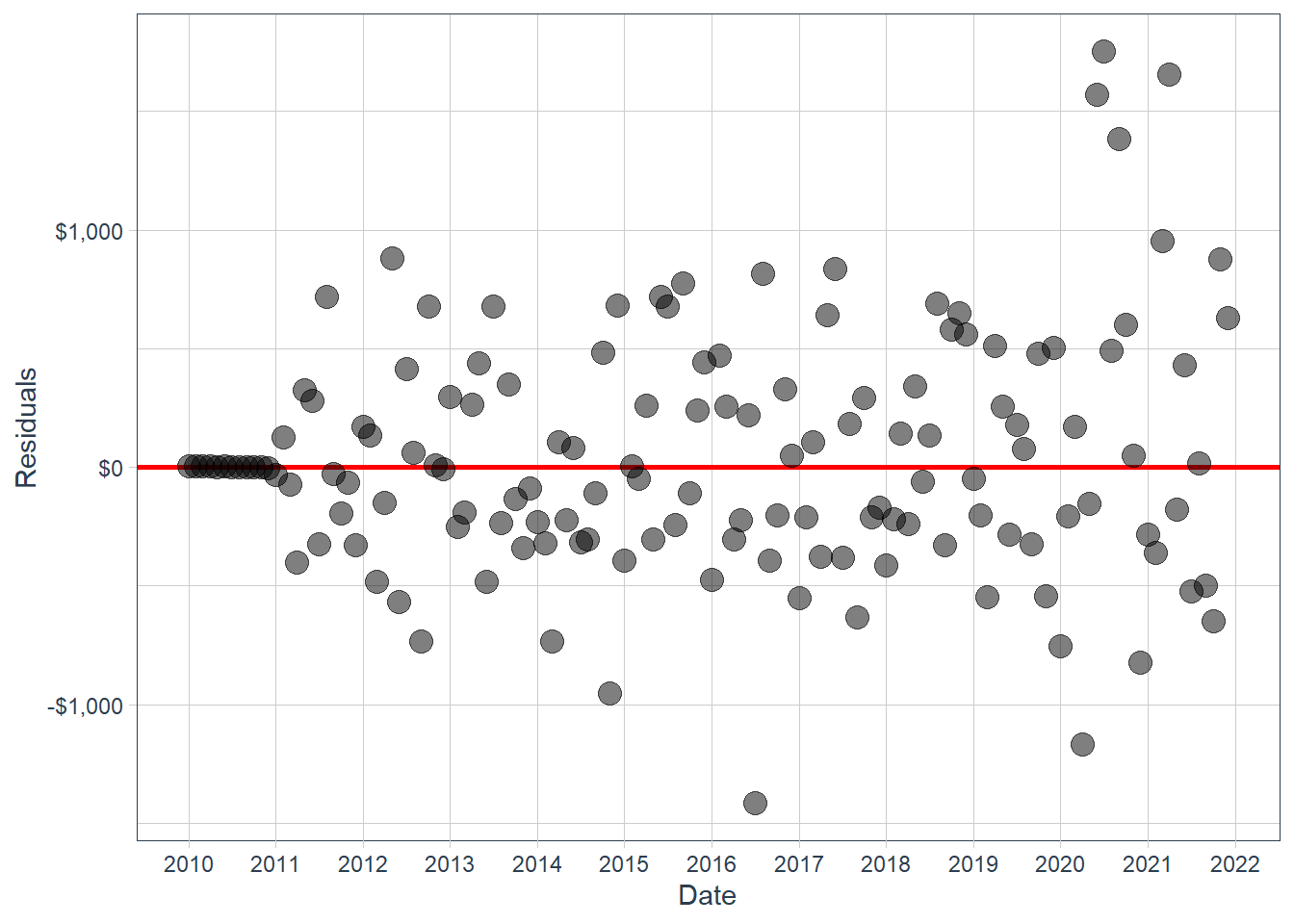
The sw_augment() function helps with model evaluation. We get the .actual, .fitted and .resid columns, which are useful in evaluating the model against the training data.
If the ARIMA model has captured the predictable autocorrelation, these residuals should have no obvious remaining time pattern. This is the same audit logic used in the fpp3 chapter.
Make a forecast using the forecast() function.
Code
fcast_arima <-forecast(fit_arima, h =10)fcast_arima
         Point Forecast    Lo 80    Hi 80    Lo 95    Hi 95
Jan 2022       12958.70 12262.28 13655.11 11893.62 14023.77
Feb 2022       13978.00 13237.17 14718.84 12844.99 15111.01
Mar 2022       16341.49 15596.23 17086.75 15201.71 17481.27
Apr 2022       16704.29 15930.63 17477.96 15521.07 17887.52
May 2022       17095.58 16313.50 17877.65 15899.50 18291.66
Jun 2022       18163.88 17360.62 18967.14 16935.40 19392.36
Jul 2022       16011.91 15197.81 16826.02 14766.85 17256.98
Aug 2022       16996.29 16164.63 17827.95 15724.38 18268.21
Sep 2022       16153.24 15309.50 16996.97 14862.86 17443.61
Oct 2022       16437.31 15578.01 17296.60 15123.13 17751.48
Notice that we have the entire forecast in a tibble. We can now more easily visualize the forecast.
Code
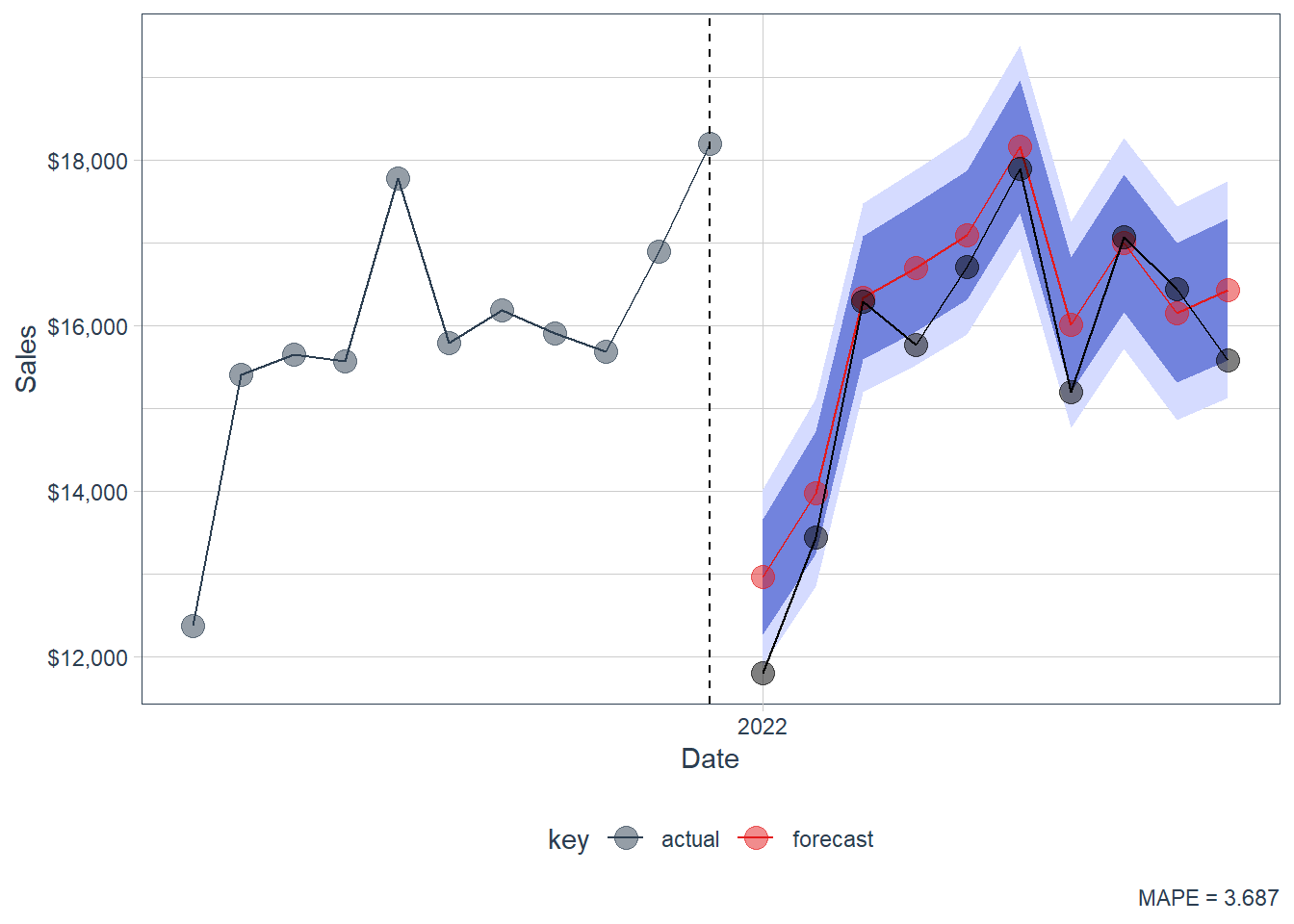
fcast_tbl %>%filter(index >as.Date("2021-01-01")) %>%ggplot(aes(x = index, y = sales, color = key)) +geom_ribbon(aes(ymin = lo.95, ymax = hi.95),fill ="#D5DBFF", color =NA, linewidth =0) +geom_ribbon(aes(ymin = lo.80, ymax = hi.80, fill = key),fill ="#596DD5", color =NA, linewidth =0, alpha =0.8) +geom_line() +geom_point(size =4, alpha =0.5) +geom_line(aes(x = date, y = sales), color ="black",data = actuals_tbl) +geom_point(aes(x = date, y = sales), color ="black", size =4,alpha =0.5, data = actuals_tbl) +geom_vline(xintercept =as.numeric(as.Date("2021-12-01")),linetype =2) +labs(x ="Date", y ="Sales",caption =paste("MAPE =",round(100*mean(abs(error_tbl_arima$error_pct)), 5))) +scale_x_date(date_breaks ="1 year", date_labels ="%Y") +scale_color_tq() +scale_fill_tq() +theme_tq() +scale_y_continuous(labels = scales::dollar)
Figure 2.5: Forecast. forecast::auto.arima.
The resulting forecast serves as a benchmark.
In this render, forecast::auto.arima has MAPE around 3.69. This makes it a strong benchmark: it beats the supervised machine-learning forecasts in this specific holdout period and lands close to the best models from the first chapter. That result is pedagogically useful because it shows that classical time-series structure can remain highly competitive when the series has strong trend, seasonality and autocorrelation.
2.6 Summary of all results
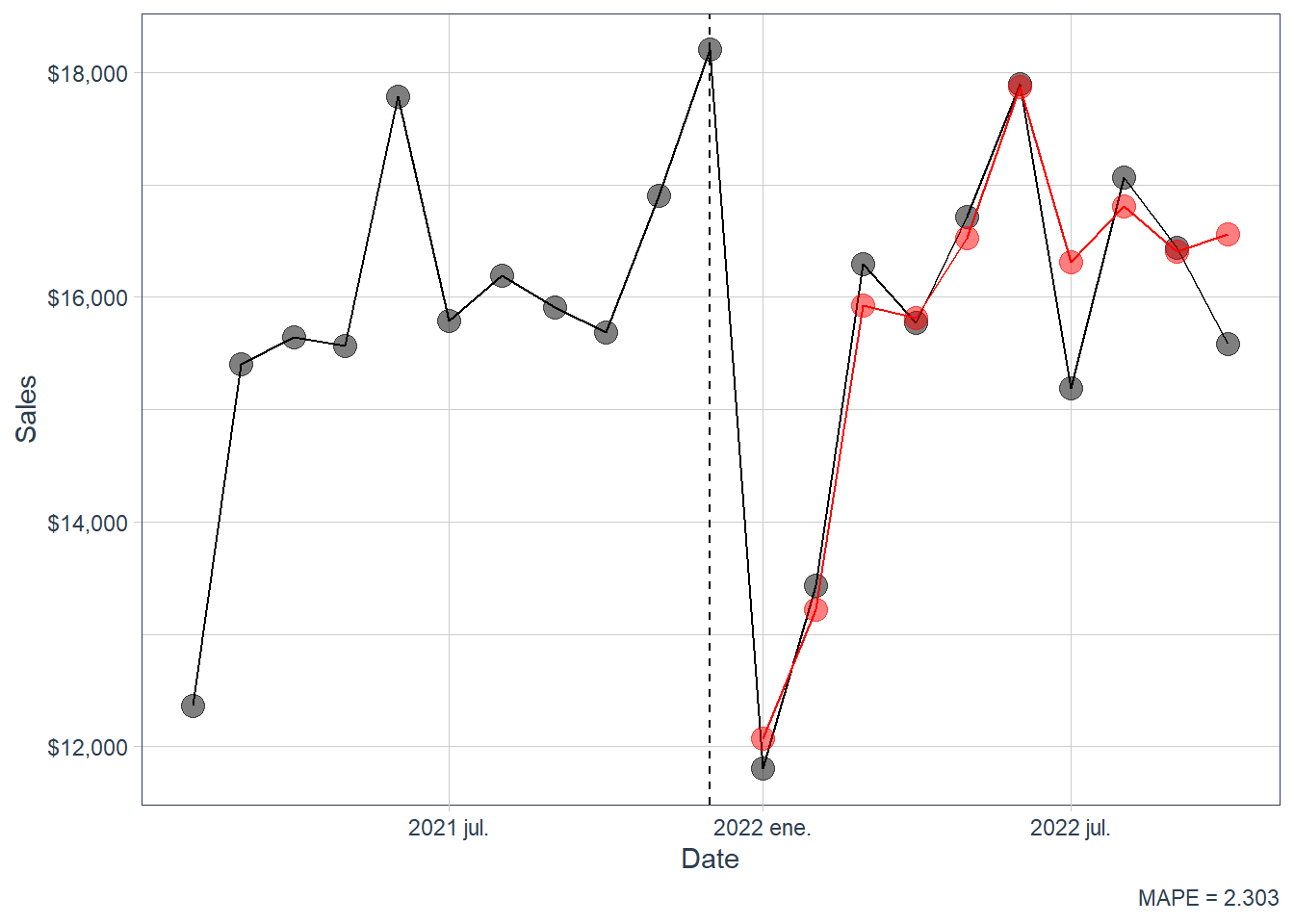
An interesting question is: What happens to the accuracy when you average the predictions of different methods? This question makes sense because model choice is often uncertain in forecasting. Taking the average can reduce extreme results, although it can also be harder to interpret because the final forecast comes from several techniques.
If there are \(M\) forecast models, the average forecast is
This ensemble rule is applied after the individual forecasts already exist. Its appeal is that different models can make different errors, so averaging may reduce model-specific noise. Its cost is interpretability: the final number no longer comes from one clear structural assumption.
In order to calculate the average forecast we need to load the forecasts from the previous section. In particular, we include the seasonal naive, NNAR(15,1,8)[12], ETS(M,A,M), and ARIMA(4,1,1)(0,1,1)[12]. We exclude the naive, drift and mean forecasts from this average.
Code
fpp3_fc <-readRDS("fpp3_fc.rds")
We add the machine-learning forecasts and the forecast::auto.arima forecast into the fpp3 forecast table.
# A tibble: 12 × 2
   .model                          MAPE
   <chr>                          <dbl>
 1 Average forecast                2.30
 2 forecast::auto.arima            3.69
 3 fpp3: ETS(M,A,M)                3.77
 4 fpp3: seasonal naïve            3.89
 5 fpp3: ARIMA(4,1,1)(0,1,1)[12]   4.40
 6 ML forecast: neural network     4.91
 7 ML forecast: regression tree    5.16
 8 ML forecast: linear regression  5.81
 9 fpp3: NNAR(15,1,8)[12]          6.02
10 fpp3: naïve                    18.1
11 fpp3: drift                    20.9
12 fpp3: mean                     23.5
The ranking is local to this data set and this holdout period. The main lesson is that a transparent workflow lets us see where the forecast comes from, how the model was selected, how long it takes to render, and how it performs when confronted with truly unseen data.
The average forecast is the best row in this render, with MAPE around 2.37. That result has a clear interpretation: the individual models make different errors, and averaging reduces part of that model-specific noise. The cost is interpretability because the final number comes from several forecasting rules. For teaching purposes, this is a valuable ending point: students can see that the best empirical forecast may come from combining models, while the individual models remain necessary for understanding what information the forecast is using.